BO1 ZOMBIES / IN YOUR BROWSER
BLACK OPS
BROWSER.
Back to the theater. Back to surviving.
Choose your map and play BO1 Zombies
without leaving this page.

LIGHTS OUT. GAME ON.
Desktop + keyboard & mouse
First load downloads game resources.
01 NO SEPARATE INSTALLERGame files load in your browser.
02 MADE FOR DESKTOPUse a keyboard and mouse.
03 GIVE IT A MOMENTStay on this tab during the first load.
PICK YOUR NEXT DROP
TEN MAPS.
SAME INSTINCT.
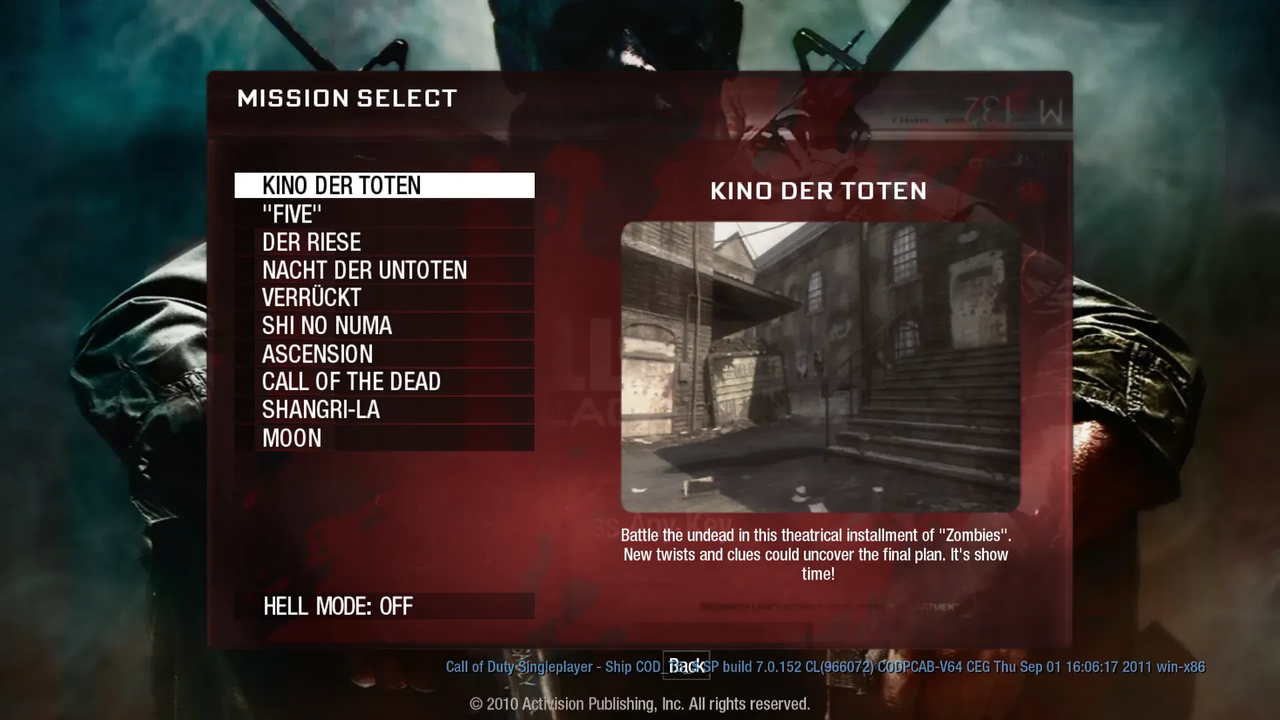
Start with our tested Kino launch, or choose another entry from the original BO1 browser project. Each map loads separately.
Map previews are from the original project’s map menu. A map appearing here confirms it is listed by that project. It does not mean we have completed a play test on every map.
A LITTLE PREPARATION GOES A LONG WAY
YOUR FIELD GUIDE.
Get into the game. Know what to expect. Keep the next round moving.
How to play Black Ops Browser
You found the clip. Now you want the game. This Black Ops Browser page brings the BO1 Zombies project into a playable window, with a map selector and help close by. Start with Kino der Toten: it is the map we reached in our initial desktop Chrome test.
- Use a desktop computer. Open this page in a current Chrome browser with a keyboard and mouse. The source project currently rejects mobile devices. A larger phone screen or desktop-site setting does not change that requirement.
- Choose a map, then start. Your selection opens that map in the player. The game needs to download substantial resources before it can run, so leave the tab open and watch the game's own loading message.
- Click inside the game when prompted. Keep this browser tab in the foreground. The game needs your click to capture mouse input; clicking a surrounding page control is not the same action.
- Check the game settings. Review the available controls and options before settling in. Press Escape to open the pause menu when you need to step away or return to the page.
There is no separate game installer in this flow, but “in your browser” does not mean “nothing to download.” Your first Black Ops Browser session includes a resource download. Refreshing or leaving the page may mean downloading those resources again, so avoid repeatedly reloading a download that is still progressing.

The controls to check before round one
For Black Ops Browser, the first useful input is a click inside the active game window. If the pointer is still moving freely across the surrounding website, the game may not yet have captured it. Bring the tab forward and click the game's start prompt again. When the pointer is released, the first click may only recapture the mouse; do not assume it fires a shot.
| Action | Default input |
|---|---|
| Move | W / A / S / D |
| Look around | Move the mouse after the game captures it. |
| Fire | Left mouse button |
| Aim down sights | Right mouse button — toggle aim |
| Jump / stand | Space |
| Interact / use | F |
| Reload | R |
| Pause menu | Escape |
These bindings come from the author's published default controls. Your in-game settings can override them, and this table is not a readout of your current setup. Our Black Ops Browser test confirmed Escape opens the pause menu; the remaining bindings are source-checked defaults. Controller and touch support have not been verified here.


Which Black Ops Browser game is this?
This player opens the BO1 Zombies project hosted at vel.gg/bo1z. If you searched for Black Ops Zombies browser gameplay after seeing a recent clip, this is the project featured here. It is a specific browser project, not a selector for every Call of Duty release.
BO1 maps, with a clear testing boundary
The source menu lists ten maps: Kino der Toten, Five, Der Riese, Nacht der Untoten, Verrückt, Shi No Numa, Ascension, Call of the Dead, Shangri-La and Moon. Listing a map does not establish that every route, round or feature works. Our initial Black Ops Browser check reached Kino's first round and opened its pause menu; it was not a complete match or a test of all ten maps.
BO2, NZ:P and server browsers are different
A Black Ops 2 browser search asks for a different game. This page does not offer a tested BO2 build. Nazi Zombies: Portable, often called NZ:P, is also a separate project: a Quake-based demake inspired primarily by World at War Zombies. It should not be mistaken for this BO1 project.
Finally, a “server browser” usually means a server-list feature inside an installed game. It does not describe playing Black Ops in a web browser. Keeping these versions separate helps you choose the right experience before waiting for a download.
Black Ops Browser is an independent access and guide page. The embedded project runs from a third-party source. We do not present this website as an official Activision or Treyarch service, and availability can change when the source project changes.

Black Ops Browser not loading?
Start with what you can actually see. A download that is moving, an unsupported-browser message and a game that ignores the mouse are different problems. Use the matching check below before starting another download.
The download is slow or appears stuck
Leave the game visible and check whether its displayed progress changes. Large resource downloads take time, especially on a busy connection. If Black Ops Browser stops progressing, confirm that other sites still load and try the source link to compare. A failure there too may point to the project or connection; repeated page refreshes will not fix that.
The browser reports missing support
Read the exact message first. Use a current desktop Chrome release and restart the browser after an update. A phone reporting “Desktop required” needs a desktop computer, not another refresh. If the error persists, compare with the source project and keep the message for diagnosis. Do not disable browser security protections to make it disappear.
The game runs, but the mouse does not respond
Switch directly to this tab, then click inside the game. Browser input capture may fail when a game is launched from a background tab. If Black Ops Browser is paused, use its visible resume option and click again when prompted. Avoid reloading a working game merely to recover focus.
Restarting a Black Ops Browser session
Try Escape first. If that produces no response, wait briefly before restarting the player. A restart can end your current session and trigger another resource download. Note the map, browser version and exact point of failure; those details are more useful than assuming every map has the same problem.

A few quick answers
Can I play Black Ops Browser on my phone?
The embedded BO1 project currently requires a desktop computer. We do not offer touch controls or claim phone support. You can read the guide on mobile, then return on a computer with a keyboard and mouse.
Does Black Ops Browser support multiplayer?
Multiplayer has not been verified for this embedded experience. Do not plan a session with friends on the assumption that lobbies, invitations or cooperative play are available. Check the source project's current information for changes.
Will my download and progress stay after I leave?
Do not rely on persistent storage in this embedded player. Returning to Black Ops Browser may require another resource download, and we have not verified saved progress across visits. Finish your session before closing or refreshing the page.
What has actually been tested?
Our initial desktop Chrome test of Black Ops Browser completed loading, entered Kino der Toten's first round and opened the pause menu with Escape. Other maps, complete matches and other browsers remain unverified. This is a limited compatibility check, not a guarantee of uninterrupted play.